AC Not Turning On? Check These 5 Things First
Kevin Allen
Co-Founder & Service Lead

AC won't turn on? Run these 5 quick checks - thermostat, breaker, filter, drain switch - before you call. Same-day help from AirWorks: (805) 312-9539.
Why Your AC Won't Turn On — And What to Check Right Now
When AC not turning on leaves you wondering what to check first, start with these five quick checks before calling a technician:
- Thermostat — Confirm it is set to COOL with the temperature at least 3–5 degrees below room temperature, and replace the batteries if the screen is blank or dim.
- Circuit breaker — Check your electrical panel for a tripped AC breaker and reset it once if needed.
- Power switches — Verify the indoor shutoff switch near your air handler and the outdoor disconnect switch near the condenser are both in the ON position.
- Air filter — A severely clogged filter can trigger an automatic safety shutdown; replace it if it has not been changed in 30 or more days.
- Condensate drain line — A blocked drain can trip a float switch that cuts power to the entire system to prevent water damage.
These five checks alone resolve the majority of AC no-start situations — no tools required, and no service call needed.
It is a sweltering afternoon in Ventura County, and you walk over to the thermostat expecting cool relief. Nothing happens. The frustration is immediate, and the worry about an expensive repair sets in fast. The good news is that an AC not turning on is almost always a power or control issue, not a catastrophic mechanical failure. According to multiple HVAC sources, basic checks like thermostat settings, circuit breakers, and air filters resolve between 40 and 60 percent of all AC no-start situations — meaning there is a real chance you can fix this yourself in under 15 minutes.
I’m Kevin Allen, co-founder of AirWorks and the qualifying individual on our C-20 and C-36 licence. Walk through the five steps below in order, and you will either restore your cooling quickly or know exactly what to tell your technician when you call.
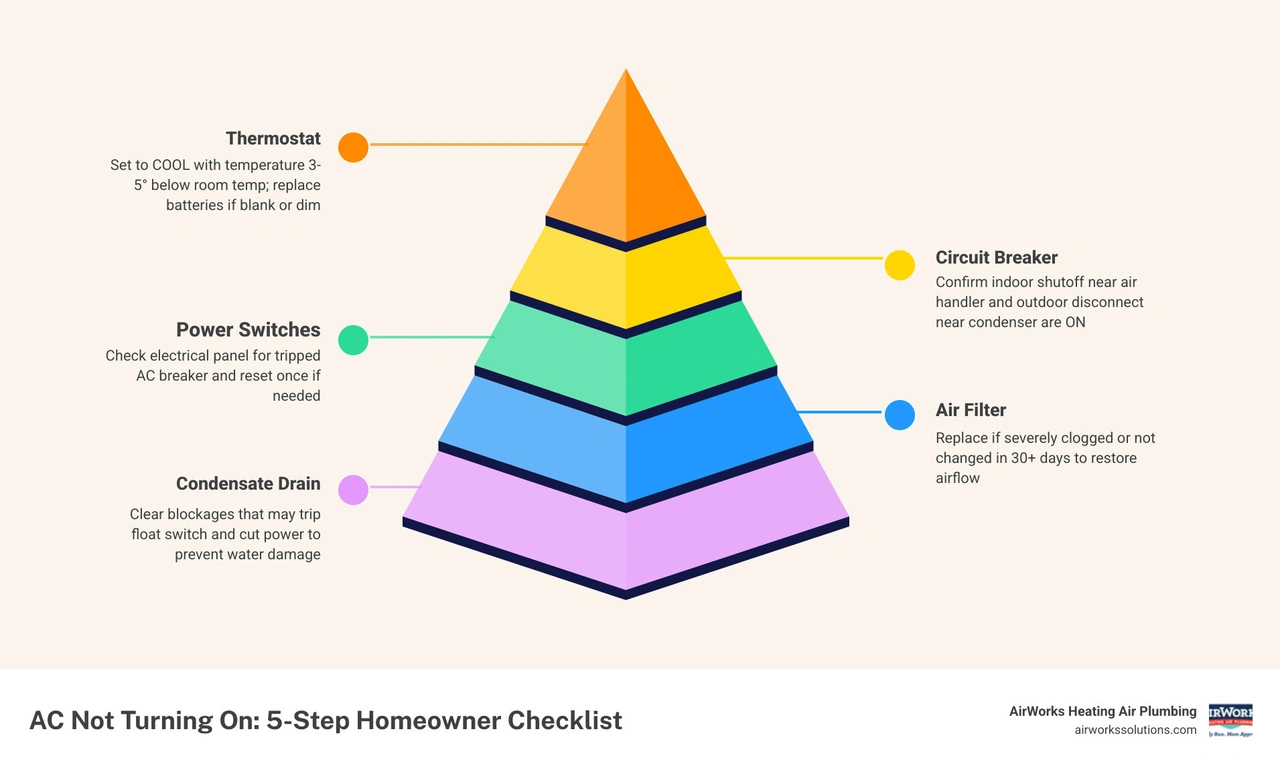
AC Not Turning On What to Check First: The 5-Step Homeowner Checklist

Modern air conditioning systems are incredibly smart. They are designed with several built-in protective shutoffs to prevent expensive components, like your compressor, from burning out. When a safety limit is triggered, your system will instantly cut power. To the homeowner, it looks like a dead, broken system. To an HVAC technician, it is simply a system doing its job to protect itself.
Before assuming you need a complete system replacement, run through this prioritized, step-by-step troubleshooting sequence. This is the exact same mental checklist our technicians use when they arrive at a home. If you want to keep your system from running into these issues altogether, make sure you are staying on top of your routine maintenance with our Pre-Summer HVAC Inspection Checklist.
Step 1: Verify Thermostat Settings and Power
Your thermostat is the brain of your entire heating and cooling system. If the brain is asleep, the body won't move. If your AC is completely silent, your very first stop should be the thermostat.
- Check the Display: Is the screen completely blank? If so, the thermostat has lost power. Many modern thermostats run on batteries (usually AA or AAA). Pop the cover off and replace the batteries with fresh ones. Even if the display is barely visible, weak batteries may not have enough power to close the internal relay and send the "call for cooling" signal to your AC.
- Confirm the Mode: It sounds silly, but verify that the thermostat is actually set to "Cool" and not "Heat" or "Off." It is incredibly common for a family member to accidentally bump the switch or change the program.
- Adjust the Temperature: Lower the setpoint temperature so it is at least 3 to 5 degrees below the current room temperature. You should hear a faint "click" from the thermostat as it calls for cooling. Give the system up to five minutes to turn on, as most systems have built-in time-delay loops to prevent short-cycling.
Step 2: Inspect the Circuit Breaker and Power Switches
If your thermostat is working but the system remains dead, you are likely dealing with an electrical interruption. Your AC relies on two separate power sources: a high-voltage line for the outdoor compressor and fan, and a lower-voltage line for the indoor blower and control board.
First, head to your main electrical panel. Look for the double-pole circuit breaker labeled "AC" or "HVAC."
- The "Middle" Trip: A circuit breaker does not always flip completely to the "Off" position when it trips. Often, it gets stuck in the middle. Gently push the breaker completely to the "Off" position until you hear it click, then flip it firmly back to "On." Do not attempt to reset it more than once if it trips again immediately; this indicates a serious electrical fault.
- The Indoor Shutoff Switch: Next, head to your indoor air handler or furnace (usually located in an attic, closet, or garage). Nearby, you should see a switch that looks exactly like a standard household light switch. This is your indoor emergency shutoff. It is very common for homeowners to accidentally flip this switch while reaching for storage boxes or searching for a light. Ensure it is switched to the "ON" position.
- The Outdoor Disconnect Box: Go outside to your condenser unit. Mounted on the wall of your home nearby, you will find a metal box. Inside is either a pull-out fuse block or a lever switch. Make sure the pull-out block is inserted securely in the "ON" position or that the lever is flipped up.
If you find yourself in the middle of a scorching heatwave in Ventura County and these power checks do not solve the issue, you may need to consult our Emergency HVAC Repair Moorpark Guide for immediate assistance.
Step 3: Check for a Clogged Air Filter
Can a simple piece of pleated fabric really prevent your entire AC from turning on? Absolutely. In fact, a dirty or clogged air filter is the cause of about 50% of all AC problems.
When an air filter is heavily loaded with dust, pet dander, and debris, it severely restricts airflow. Without enough warm air blowing over your indoor evaporator coil, the refrigerant inside the coil drops below freezing. Moisture in the air quickly condenses onto the coil and freezes solid, turning your indoor unit into a block of ice.
Once the coil freezes, safety sensors or high-pressure switches will shut down the compressor to prevent liquid refrigerant from flooding back into it. If your system has stopped running, check your filter immediately. If it looks grey, fuzzy, or completely blocked, slide a fresh one in. If you suspect your coil has frozen, turn the thermostat to "Off" and turn the indoor fan setting to "On." Let the fan run for 2 to 4 hours to completely melt the ice before attempting to run the AC again. To learn more about how simple neglect can lead to major component failures, read about the Most Common AC Repairs and What Causes Them.
Step 4: Examine the Condensate Drain Line and Float Switch
Your AC does more than cool your home; it dehumidifies it. As warm indoor air passes over the cold evaporator coil, moisture condenses on the metal fins and drips into a drain pan below. This water is supposed to flow safely out of your home through a PVC condensate drain line.
However, a clogged condensate drain line is the most common preventable AC failure in summer. High humidity causes algae, mold, and biological slime to grow rapidly inside the drain line. When the line clogs, water backs up into the drain pan.
To prevent water from overflowing and destroying your drywall or ceiling, modern systems are equipped with a safety float switch. When the water level rises, a small float floats up, breaks the low-voltage circuit, and shuts down the entire system instantly.
- How to Inspect: Locate your indoor drain pan. If you see standing water in the pan or inside the clear plastic float switch cylinder, your drain line is clogged.
- How to Clear It: You can often clear this backup yourself. Go outside to where the PVC pipe exits your home. Attach the nozzle of a wet-dry utility vacuum to the end of the line. Wrap a rag around the connection to create a tight seal, and run the vacuum for 10 to 15 seconds. This will usually suck out the clog, allowing the float switch to drop back down and restore power to your AC.
Step 5: Look for an Outdoor Unit Reset Button
Some outdoor condenser units feature a dedicated, physical reset button. This is typically a small, rubber-covered red or yellow button located near the bottom of the service panel on the outdoor unit.
If your system experienced a temporary power surge or a minor system error, it may have entered a safety lockout mode.
- To Reset: Turn off your AC at the thermostat first. Go outside and firmly press the reset button. If you feel it click, it has reset.
- The Hard Power Cycle: If your unit does not have a physical button, you can perform a manual "hard reset." Turn the thermostat completely off. Go to your electrical panel and flip the AC breaker to "Off." Leave it off for a full 30 minutes. This allows the internal control boards to clear any temporary error codes and lets system pressures equalize. After 30 minutes, flip the breaker back on, set your thermostat to "Cool," and wait 5 minutes to see if the outdoor fan kicks back on.
Understanding the Difference Between Power Issues and Mechanical Failures
When your AC refuses to start, it is crucial to understand whether you are dealing with a simple electrical interruption or a deeper mechanical failure. This distinction will help you decide whether you can handle the fix yourself or if it is time to call in the professionals.
| Symptom | Likely Cause | Category | What to Do |
|---|---|---|---|
| Thermostat screen is completely blank; whole system is silent | Dead batteries, tripped indoor breaker, or blown control board fuse | Power Issue | Replace batteries; check main electrical panel and indoor switches |
| Indoor blower fan runs, but outdoor condenser is completely silent | Tripped outdoor breaker, blown disconnect fuse, or failed capacitor | Power / Electrical | Reset outdoor breaker once; inspect outdoor disconnect |
| Outdoor unit hums or clicks, but the fan and compressor will not start | Failed start/run capacitor or seized fan motor | Electrical Component | Call a professional technician to test and replace the capacitor |
| System starts, runs for 30 seconds, then shuts off (short-cycling) | Clogged air filter, clogged drain line, or low refrigerant pressure | Mechanical / Safety | Replace filter; clear drain line; call a pro if pressure switch is tripped |
| Outdoor fan spins, but the air blowing out is cool and indoor air is warm | Failing compressor, broken valves, or severe refrigerant leak | Mechanical Failure | Turn system off immediately; call a licensed HVAC technician |
If you suspect that your compressor is the culprit behind your cooling woes, you can learn more by reading our detailed guide on How to Tell if AC Compressor is Failing.
Advanced Electrical Components: Capacitors and Contactors
If you have completed the five basic steps and your outdoor unit still refuses to kick on, the problem likely lies within the outdoor unit's electrical service panel. Two small but critical components are responsible for starting and running your outdoor system: the capacitor and the contactor.
- The Capacitor: Think of the capacitor as a small, cylindrical battery that delivers a massive burst of electrical energy to kick-start your compressor and fan motor. Because starting an AC motor requires up to three times more power than running it, the capacitor is essential. Over time, extreme summer heat and electrical surges degrade the capacitor. When it fails, you will often hear a distinct humming sound coming from your outdoor unit, but the fan blades will not spin.
- The Contactor: The contactor is a heavy-duty relay switch. When your thermostat calls for cooling, it sends a 24-volt signal to the contactor, creating a magnetic field that pulls a metal bridge down. This closes the high-voltage circuit, sending 240 volts of electricity straight to the compressor and fan. Over years of use, the metal contact points can become pitted, burned, or even welded together, preventing power from reaching the motors.
A Crucial Safety Warning: While these parts are inexpensive, they are highly dangerous. Capacitors store massive amounts of electrical energy even when the main power to your home is completely shut off. Touching the terminals of a charged capacitor can result in a severe, life-threatening electrical shock. Unless you are a licensed professional with specialized safety gear and a multimeter, you should never attempt to test or replace these components yourself. If you want to understand why these components fail and how to protect your system, check out our resource on Why Your AC Compressor Fails and What to Do.
When to Call a Professional HVAC Technician
We always encourage homeowners to try the simple, safe troubleshooting steps first. However, there is a clear line where DIY troubleshooting should stop for your own safety and the safety of your equipment. You should immediately turn off your system at the thermostat and call a licensed professional if you encounter any of the following:
- Repeatedly Tripping Breakers: If your AC breaker trips a second time after you reset it, do not try again. This is a clear indicator of a grounded compressor, a short circuit, or a failing motor drawing dangerous levels of electrical current.
- Burning Odors or Sparks: If you smell electrical burning, sulfur, or see sparks coming from either your indoor air handler or outdoor condenser, shut off the main power breaker immediately.
- Unusual Noises: Loud screeching, metallic banging, or rapid clicking sounds point to mechanical failures, loose fan blades, or damaged internal compressor valves.
- Refrigerant Leaks: If you notice a hissing sound near your refrigerant lines or find ice forming on your outdoor unit's copper pipes, you likely have a refrigerant leak. Handling refrigerant requires specialized EPA certification and tools.
For residents living in our coastal and valley communities, you can access localized, expert help by visiting our AC Repair Agoura Hills CA Complete Guide or our AC Repair Bell Canyon CA Complete Guide.
Frequently Asked Questions About AC Startup Issues
What should I do if my thermostat is set to cool but my AC not turning on what to check first?
If your thermostat is set correctly but nothing is happening, check your condensate safety float switch first. A clogged drain line backing up water into the drain pan will instantly kill power to your system. Next, verify that your thermostat batteries are fresh and check your main electrical panel for a tripped double-pole circuit breaker.
If the condenser is silent and my AC not turning on what to check first?
When the indoor blower fan is running but the outdoor condenser is completely silent, the problem is usually a lack of power to the outdoor unit. Verify that the outdoor disconnect switch is fully plugged in and that its fuses are not blown. If the disconnect has power, the issue is likely a failed dual run capacitor or a faulty contactor.
Can a dirty air filter cause a total system shutdown?
Yes. A severely restricted air filter starves the system of air, causing the evaporator coil to freeze solid. Modern systems have high-pressure and low-pressure safety switches that detect abnormal operating conditions caused by frozen coils and will shut down the entire system to protect the compressor from permanent damage.
Conclusion
An AC not turning on can quickly turn a beautiful summer day into a stressful situation, but knowing what to check first gives you the power to stay calm and take control. By systematically checking your thermostat, resetting your breakers, replacing dirty filters, and verifying your safety float switches, you can resolve the majority of no-start issues on your own.
When those basic steps are not enough, our team at AirWorks Heating Air Plumbing is here to help. Serving homeowners across Ventura County since 2010, we bring honest, customer-focused, and reliable HVAC solutions to every single call. Whether you need a quick repair, routine maintenance, or are exploring options for an upgrade, we are committed to restoring your home's comfort quickly and professionally.
For more detailed information on local cooling services, check out our AirWorks Heating, Air & Plumbing Air Conditioning Services page, or consult our comprehensive Newbury Park HVAC Repair Guide. If your system is reaching the end of its lifespan, explore our local replacement resources with the AC Replacement Chatsworth CA Guide and the AC Replacement Fillmore CA Guide.

About the Author
Kevin Allen
Co-Founder & Service Lead
Co-founded AirWorks in 2010 and has worked in Ventura County HVAC since 2002. Leads the service and installation crews — and the fix-what's-actually-broken ethic the company was built on.
Need Help?
Contact us today to discuss your needs. Our team is ready to help.
Related Articles
Options Comparisons for Homeowners: Heat Pump vs. Gas Furnace
Read Options Comparisons for Homeowners: Heat Pump vs. Gas FurnaceWhy Is Your Air Conditioner Hissing When Off? Causes and Diagnostics
Read Why Is Your Air Conditioner Hissing When Off? Causes and DiagnosticsHeat Pump vs. Gas Furnace: Technical Options Comparisons for Homeowners
Read Heat Pump vs. Gas Furnace: Technical Options Comparisons for HomeownersReady to Get Started?
Whether you need a repair, maintenance, or a new installation, our expert team is here to help.